ASGARD Management Center v4 Manual Logo

Contents

  • 1. Requirements
  • 2. Setup Guide
  • 3. Administration
    • 3.1. System Status
    • 3.2. ASGARD Agent Deployment
    • 3.3. Uninstall ASGARD Agents
    • 3.4. Asset Management
    • 3.5. Scan Control
    • 3.6. Scan a Single System
    • 3.7. Scan a Group of Systems
    • 3.8. Scheduled Group Scan
    • 3.9. Syslog Forwarding
    • 3.10. Response Control
    • 3.11. Aurora
    • 3.12. Sigma
    • 3.13. IOC Management
    • 3.14. Evidence Collection
    • 3.15. Thunderstorm
    • 3.16. Download Links
      • 3.16.1. Use Case 1 - Share the URL without Hostname
      • 3.16.2. Use Case 2 - Share the URL with Hostname
      • 3.16.3. Use Case 3 - Use the URL in Scripts
    • 3.17. Licensing
    • 3.18. Updates
    • 3.19. User Management
    • 3.20. Additional Settings
    • 3.21. Advanced Settings
    • 3.22. User Settings
  • 4. Master ASGARD
  • 5. Maintenance
  • 6. Advanced Configuration
  • 7. Troubleshooting
  • 8. Known Issues
  • 9. Upgrade from v3.3.x to v4.0
  • 10. Appendix
  • 11. Changelog
ASGARD Management Center v4 Manual
  • 3. Administration
  • 3.16. Download Links
Previous Next

3.16. Download Links

The Downloads section lets you create and download a full THOR package including scanner, custom IOCs and MISP rulesets along with a valid license for a specific host. This package can then be used for systems that cannot be equipped with an ASGARD Agent. For example, you can use it on air-gapped networks. Copy the package to a flash drive or CD-ROM and use it where needed.

You can choose to disable the download token altogether using Disable Download Token. If disabled, anyone with network access can download and issue licenses, which may lead to unwanted exhaustion of the ASGARD license pool. You can reset the download token by disabling and then re-enabling it with New Download Token.
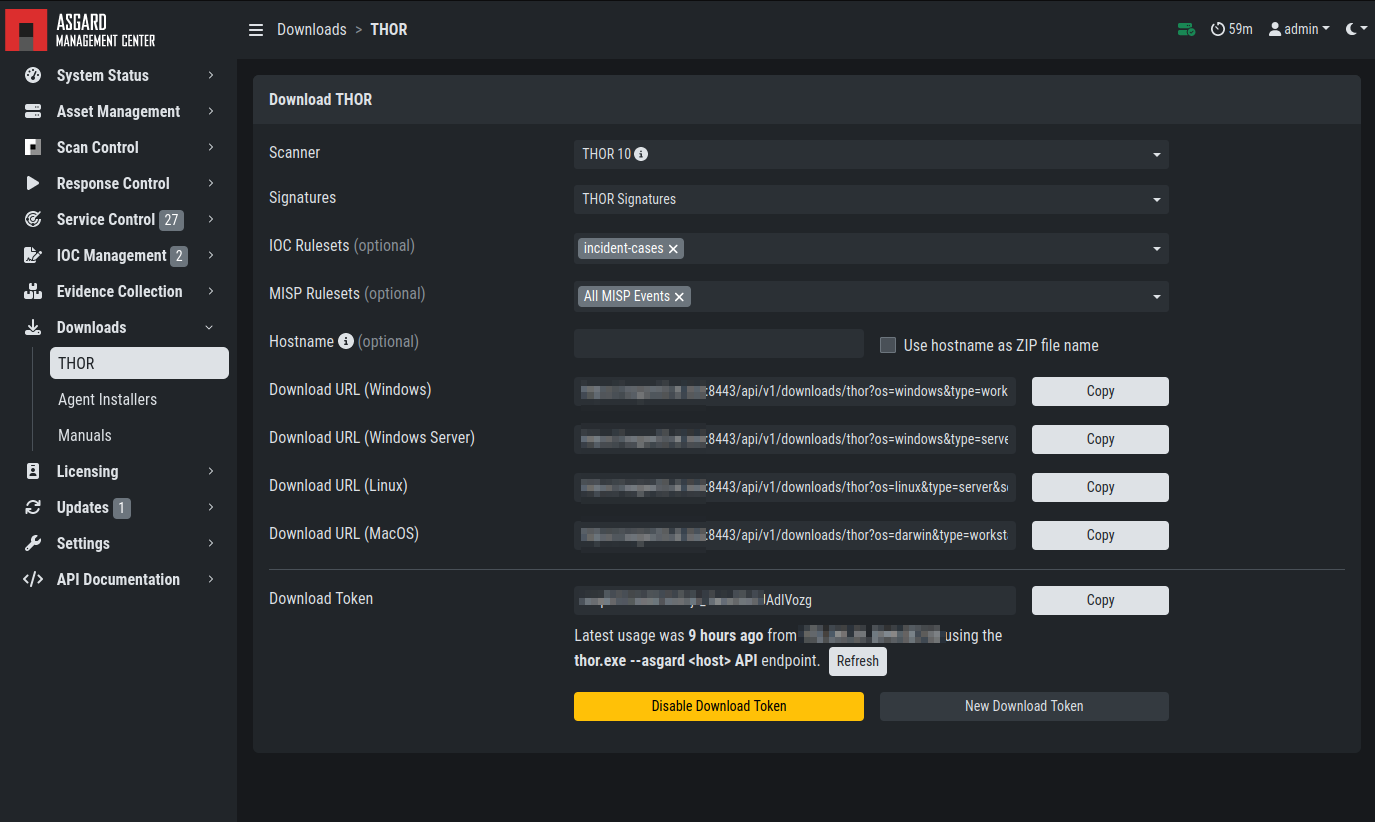
Generate THOR Package Download Link

The download link changes as you select different options in the form.

After you generate a download token and select the correct scanner, operating system and target hostname (not FQDN), you can copy the download link and use it to retrieve a full scanner package including a license file for that host. These download links can be sent to administrators or team members that don't have access to ASGARD Management Center. Recipients of that link still need to be able to reach ASGARD's web server port (443/tcp). The token can be used to download THOR or a THOR license without an ASGARD account.

Warning

If you disable the token, anyone with network access can download THOR from this ASGARD system or generate licenses.

Note

The scanner package will not contain a license file if you do not set a hostname in the Target Hostname field. If you have an Incident Response license, you must provide it separately.

3.16.1. Use Case 1 - Share the URL without Hostname

You can generate download links without an included license by leaving the hostname field empty. A valid license (e.g. "Incident Response") must be placed in the program folder after the download and extraction.

3.16.2. Use Case 2 - Share the URL with Hostname

By including the hostname in the form, a license will be generated and included in the download package. You can copy the final download link and send it to anyone who can use this link to download a package and run scans on a host with that name.

You or the recipient can change the name in that URL to make it usable on other systems.

You may have to adjust the type field to get the correct license type (client for workstations, server for servers) and the THOR version (win, linux, osx) to generate the correct URL.

.../thor?os=windows&type=server&scanner=thor10%40latest&hostname=mywinserver...
.../thor?os=windows&type=workstation&scanner=thor10%40latest&hostname=mywinwks1...
.../thor?os=linux&type=server&scanner=thor10%40latest&hostname=mylinuxsrv1...

3.16.3. Use Case 3 - Use the URL in Scripts

By default, the generated download link is protected with a token that makes it impossible to download a package or generate a license without knowing that token. This token is specific to each ASGARD instance.

You can use that URL in Bash or PowerShell scripts to automate scans on systems without an installed ASGARD Agent.

$Type = "server"
$Hostname = "server1"
$Token = "my-unique-token"
$Download_Url = "https://asgard2.nextron:8443/api/v1/downloads/thor?os=windows&type=$($Type)&scanner=thor10%4010.6&signatures=signatures&hostname=$($Hostname)&token=$($Token)"
Previous Next

© Copyright 2025, Nextron Systems GmbH.

Built with Sphinx using a theme provided by Read the Docs.