1.4. Network Requirements
ASGARD and the systems that communicate with it require the following ports to be open in the network. For a detailed and up-to-date list of our update and licensing servers, see https://www.nextron-systems.com/hosts/.
Important
The use of a web proxy that performs TLS/SSL interception is not supported. TLS interception will break both the agent-to-Management-Center connection and the connection to our update and licensing servers. Installing the intercepting proxy's CA on the ASGARD appliance does not work around this.
Attempting this can result in errors like the one below:
Certificate verification failed: The certificate is NOT trusted.
The certificate issuer is unknown.
Could not handshake: Error in the certificate verification.
1.4.1. From ASGARD Agent to ASGARD Server
Description |
Ports |
|---|---|
Agent / Server communication |
443/tcp |
Syslog Forwarder (optional) |
514/udp [1] |
ASGARD online check (optional) |
ICMP |
The syslog port is optional because agents can operate without it. See Syslog Forwarding for more information.
Hint
ASGARD Agents check whether they can reach ASGARD via HTTPS. ICMP is not required, but it helps during troubleshooting.
1.4.2. From Management Workstation to ASGARD Server
Description |
Ports |
|---|---|
Administrative web interface |
8443/tcp |
Command line administration |
22/tcp |
1.4.3. From ASGARD to SIEM
Description |
Ports |
|---|---|
Syslog forwarder |
514/udp [1] |
1.4.4. From ASGARD to Analysis Cockpit
Description |
Ports |
|---|---|
Asset Synchronization, Log and Sample forwarding |
7443/tcp |
Syslog forwarder (optional) |
514/udp [1] |
1.4.5. From ASGARD and Master ASGARD to the Internet
The ASGARD systems are configured to retrieve updates from the following remote systems via HTTPS on port 443/tcp:
Product |
Remote Systems |
|---|---|
ASGARD and system updates |
update-301.nextron-systems.com |
THOR, Aurora, and Signature updates |
update1.nextron-systems.com |
THOR, Aurora, and Signature updates |
update2.nextron-systems.com |
Configure all proxy systems to allow access to these URLs without TLS/SSL interception. ASGARD uses client-side SSL certificates for authentication. You can configure a proxy server, username, and password during the ASGARD platform setup process. Only Basic authentication is supported. NTLM authentication is not supported.
1.4.6. From Master ASGARD to ASGARD
Description |
Port |
|---|---|
Management Backend |
5443/tcp |
You cannot manage ASGARD v4 systems from a Master ASGARD v3 and vice versa.
1.4.7. From Management Workstation to Master ASGARD
Description |
Port |
|---|---|
Administrative web interface |
8443/tcp |
Command line administration |
22/tcp |
1.4.8. Thunderstorm (optional)
Thunderstorm uses the following ports. This is optional and only required if you plan to use Thunderstorm in ASGARD.
Description |
Port |
|---|---|
HTTPS |
9443/tcp |
HTTP |
8080/tcp |
See Thunderstorm for more information.
1.4.9. Secure Communication
Connections within our products use TLS, except for syslog over plaintext. Clients verify the server certificate used by ASGARD Management Center when connecting. This helps prevent attackers from reading sensitive information during a man-in-the-middle attack.
1.4.10. Time Synchronization
ASGARD tries to reach the public Debian time servers by default.
Server |
Port |
|---|---|
0.debian.pool.ntp.org |
123/udp |
1.debian.pool.ntp.org |
123/udp |
2.debian.pool.ntp.org |
123/udp |
The NTP server configuration can be changed.
1.4.11. DNS
ASGARD needs to be able to resolve internal and external IP addresses.
Warning
Make sure that you install ASGARD with a domain name
(see Network Configuration). If you do not set the
Domain Name before installing the ASGARD package, your clients will not
be able to connect to ASGARD.
All installed components should have a valid domain name configured to avoid issues later in the configuration.
1.4.12. Internet Access during Installation
The Nextron Universal Installer requires Internet access during setup. The installation process fails if required packages cannot be loaded from https://update-301.nextron-systems.com.
1.4.12.1. SSL/TLS Interception
The installation and update processes do not accept an unknown but valid SSL/TLS certificate presented by an intercepting entity and therefore do not support SSL/TLS interception.
Because our products are often used in potentially compromised environments, the integrity of our software and update packages has highest priority.
1.4.13. Architecture Overview
The following image shows an architecture overview with all products and their communication relationships.
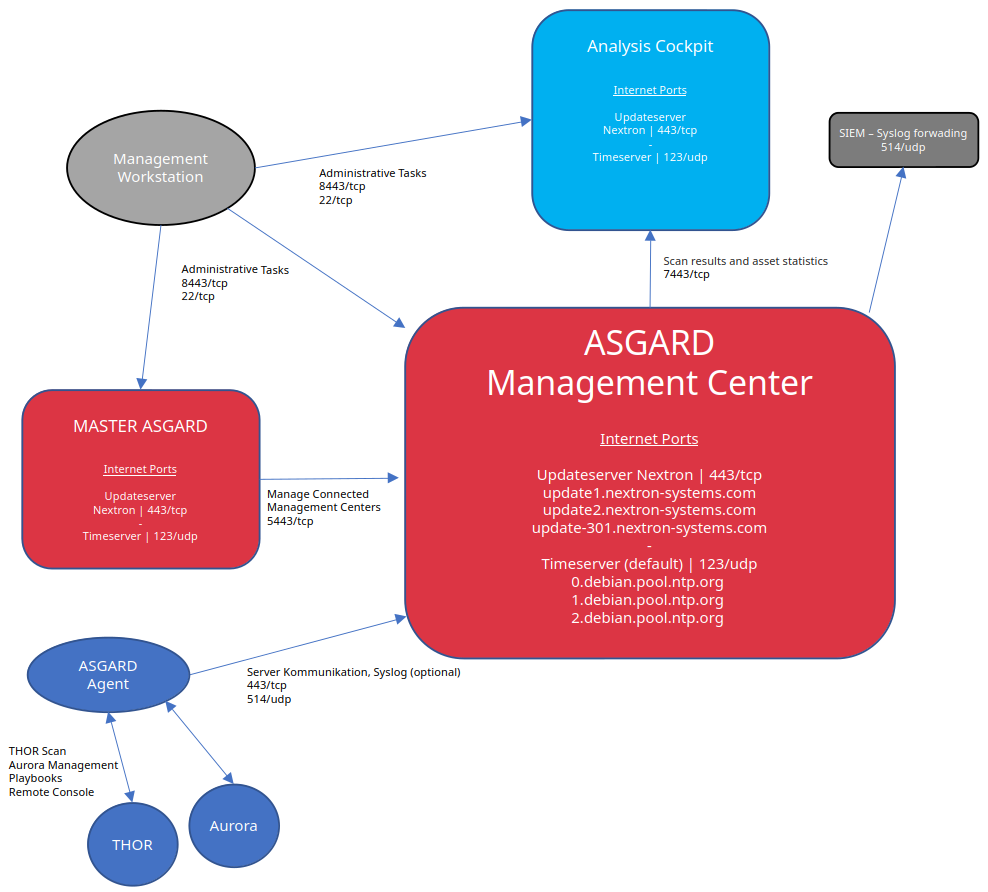
Full Architecture
Footnotes