5.1. Backup & Restore
You can schedule, create, and restore backups of your ASGARD Management Center
from the Settings > Backup & Restore section.
Additionally, if you have old backups which were created via SSH on the system, you can upload them here as well.

Backup & Restore
The backup contains everything necessary to restore a freshly installed Management
Center to the point of when the backup was created. Scan and Playbook results are
not contained in those backups. If you need to store a backup of all the
Scan Logs on a separate server, you can transfer those via
built in tools (like rsync) to a remote system.
Backups are located at /var/lib/asgard-management-center/backups on the file system.
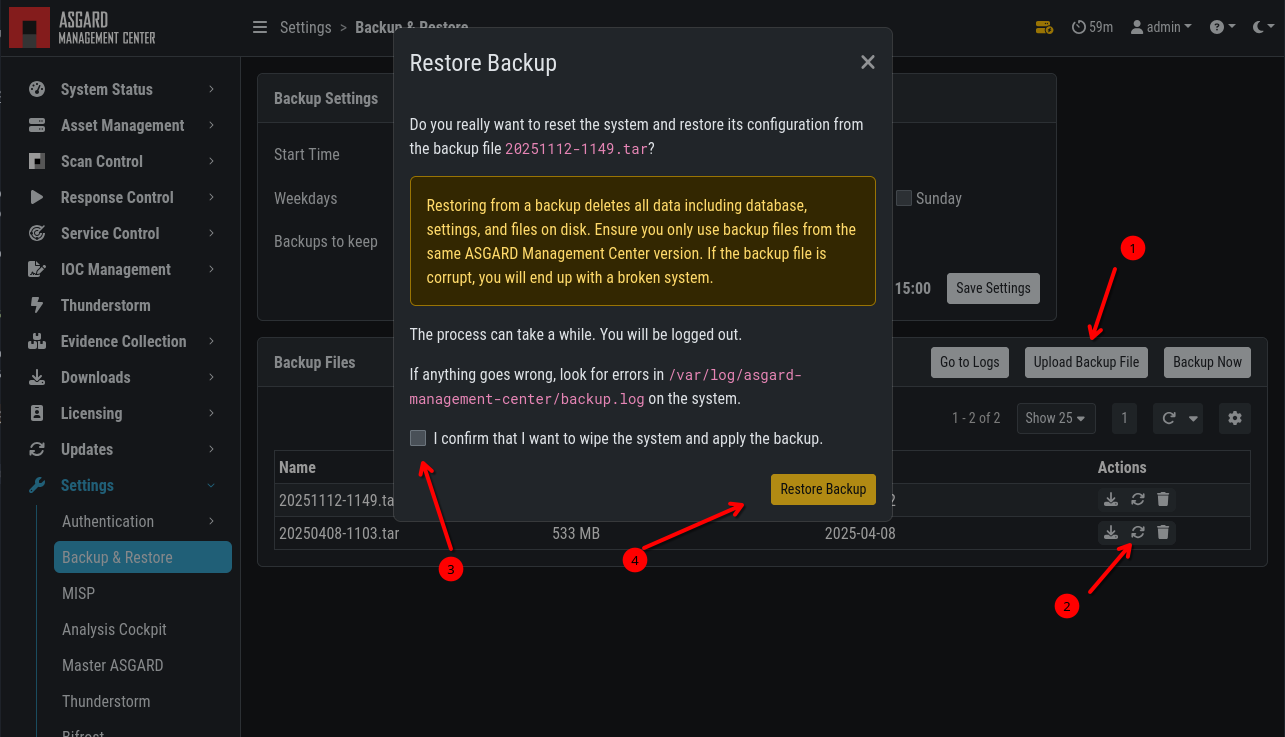
To restore a backup, you can upload the .tar file into the Backup & Restore
section of your Management Center and click the restore button.
Backup & Restore