10.5. Bypass Apple verification during installation of asgard2-agent
This section describes workarounds for IT administrators and IT packaging
teams that need to bypass Apple verification and install the personalized
asgard2-agent on macOS Big Sur or newer workstations.
10.5.1. Starting with macOS 15
Option 1: Remove the quarantine flag from the ASGARD Agent installer in a terminal session
MacBook-Pro:~ nextron$ sudo xattr -rd com.apple.quarantine /Users/nextron/Downloads/asgard2-agent-macos-arm64.pkg
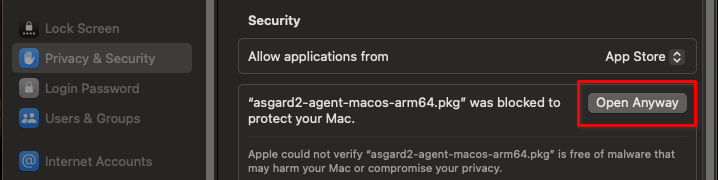
Option 2: Unblock the installer via the Security Settings
Navigate to
System Settings>Privacy & Security>SecurityClick the
Open anywaybutton next toasgard2-agent-macos-arm64.pkg ...
10.5.2. Before macOS 15
Warning
Executing this workaround puts your system at risk for a short period of time. It temporarily disables global operating system security mechanisms that protect system integrity. Follow the steps carefully and enable those security mechanisms again after you are done.
After performing any of the described actions, check your system to ensure that all security mechanisms are in place and reactivated.
Follow these steps to install the ASGARD Agent on macOS.
Open a new terminal session
Deactivate macOS Gatekeeper
sudo spctl --master-disable
Close the terminal and open a new terminal session
Install the asgard2-agent
sudo installer -pkg /path/to/asgard2-agent-macos-amd64.pkg -target /
Close the terminal and open a new terminal session
Reactivate macOS Gatekeeper
sudo spctl --master-enable
Warning
Make sure to activate macOS Gatekeeper when you are done:
sudo spctl --master-enable
You can verify the state of the macOS Gatekeeper with:
MacBook-Pro:~ nextron$ spctl --status
assessments enabled
On a system with activated Gatekeeper, the output must be assessments enabled.